Embedded Development Board Learning
Bitwise operations
Date: agosto 25, 2025
Author: Guillermo Garcia
Categories: Embedded C programming Tags: Embedded C programming

In this article we will see the Bitwise operations with bits that are very common in embedded systems programming in C as well as the bit fields. It is important to know these concepts to manipulate registers in chips.
Table of Contents
Bitwise Operations
All data is internally stored as a sequence of bits. Depending on the data type chosen, the number of bits needed to represent the data is different. A character for instance is represented by 1 byte or 8 bits.
Bitwise operators allow to directly manipulate the bits themselves. This can be very useful for instance to manipulate the content of registers inside an embedded system.
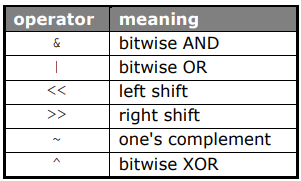
An overview of the bitwise operators is:
Bitwise operations AND
The Bitwise operations AND operation is denoted by combining two binary values with an ampersand character (&).
This operation will return a 1 in place of a digit of the new binary value if both of the combined binary
value have a 1 as that digit, and will return a 0 for that digit otherwise, like so:
short int w1 = 25, w2 = 77, w3;
w3 = w1 & w2;
The bits in w3 are set to 1 if the corresponding bits in w1 and w2 are both 1:
w1 0000 0000 0001 1001 25
w2 0000 0000 0100 1101 77
--------------------------------------------
w3 0000 0000 0000 1001 9
Bitwise operations OR
The Bitwise operations OR operation is denoted by combining two binary values with a vertical bar character (|). This
operation will return a 1 in place of a digit of the new binary value if either of the combined binary value
have a 1 as that same digit, and will return a 0 if both binary values have a 0 as that digit, like so:
short int w1 = 25, w2 = 77, w3;
w3 = w1 | w2;
The bits in w3 are set to 1 if at least 1 of the corresponding bits in w1 and w2 is 1:
w1 0000 0000 0001 1001 25
w2 0000 0000 0100 1101 77
--------------------------------------------
w3 0000 0000 0101 1101 93
Bitwise operations XOR
The Bitwise operations XOR (exclusive OR) operation is denoted by combining two binary values with a carat
character (^). This operation functions like an OR operation in that a 0 is returned if both binary values
have a 0 for that digit, and a 1 is returned for the digit if either binary value has a 1 as that digit, but whereas the bitwise OR will return 1 if both binary values have a 1 as the digit, the XOR operation would instead return 0, like so:
short int w1 = 25, w2 = 77, w3;
w3 = w1 ^ w2;
The bits in w3 are set to 1 if the corresponding bits in w1 and w2 consist of an odd number of 1’s:
w1 0000 0000 0001 1001 25
w2 0000 0000 0100 1101 77
--------------------------------------------
w3 0000 0000 0101 0100 84
One’s complement
The bitwise NOT operation turns all 0s in a binary number into 1s and vice versa, this operation
is denoted with a tilde character (~), like so:
short int w1 = 25, w3;
w3 = ~w1;
The bits in w3 are set to 1 if the corresponding bits in w1 are set to 0 and vice versa:
w1 0000 0000 0001 1001 25
------------------------------------------------
w3 1111 1111 1110 0110 65 510
Left shift
Bitshifting is the mathematical operation denoted by “<<” and “>>” that shifts every bit over to the left or
to the right, respectively.
short int w1 = 25, w3;
w3 = w1 << 2;
The bits of w1 are shifted 2 positions to the left. The last 2 positions on the right are filled with 0:
w1 0000 0000 0001 1001 25
---------------------------------------------
w3 0000 0000 0110 0100 100
Remark that shifting 2 positions to the left is equivalent to multiplying with 2². In general, shifting n positions to the left is equivalent to multiplying with 2n.
Right shift
short int w1 = 25, w3;
w3 = w1 >> 2;
The bits of w1 are shifted 2 positions to the right. The 2 leftmost positions are filled with 0 or 1 depending on the value of the MSB of w1:
w1 0000 0000 0001 1001 25
---------------------------------------------
w3 0000 0000 0000 0110 6
short int w2 = 0xCF83, w4;
w4 = w2 >> 2;
w2 1100 1111 1000 0011 -12 413
------------------------------------------------
w3 1111 0011 1110 0000 -3 104
Remark that shifting 2 positions to the right is equivalent to dividing by 2². In general, shifting n positions to the right is equivalent to dividing by 2𝑛.
Masking
Consider the example of a 16 bit register out of which only the 4 MSB’s (the 4 left most bits) need to be read. Using the above bit operators, one could shift all bits 12 positions to the right such that the 4 MSB’s become the only bits left.
Suppose the register a contains the value 23043 (0101 1010 0000 0011), a>>12 then results in: 0000 0000 0000 0101. Since leading zero’s are not be taken into account, this is equivalent to 101 which is the value of the 4 MSB’s.
Unfortunately, this is true only if the MSB of the register a is a 0! In that case the leftmost positions will be filled with 0 resulting in leading zero’s that can be ignored. However, if the MSB is a 1, shifting the bits 12
positions to the right will result in a series of 12 1’s before the bits of interest:
a = -24523 (1010 0000 0011 0101), a>>12 results in: 1111 1111 1111 1010, which is equivalent to -6. The 4 MSB’s on the other hand are 1010 which represents the number 10!
To get rid of the leading 1’s, the result of the shift operation will be treated with a bitmask that turns all bits to zero except for the ones we are interested in. This process is called bit masking.
In the above example the masking can be done by using a bitwise AND operation of the shifted number and the bit sequence that contains 0 on all positions except on the positions corresponding to the bits of interest: 0000 0000 0000 1111 or 0x000F in hex notation.
(a>>12) & 0x000F results in 0000 0000 0000 1010
Example
A programming example that returns the 4 MSB’s of a number is
#include <stdio.h>

int main(void)
{
 short number;
 printf("Enter an integer [-32768,32767]: ");
 scanf("%hd%*c", &number);
 printf("Number:\ndec: %hd \nhex: %x.\n\n", number, number);
 number = number >> 12; //shift 12 positions to the right
 printf("number shifted:\ndec: %hd or hex: %x.\n\n", number,
 number);
 number = number & 0x000f; //masking to remove leading 1's
 printf("4 MSB’s:\ndec: %hd of hex: %x.\n\n", number, number);
 return 0;
}
C Programming Bit Fields
The C language includes a method for accessing these bit fields using a syntax similar to that of structures. Bit fields allow for better memory utilization by storing data in the minimum number of bits required.
struct byteBits
{
  unsigned int bit0: 1;
  unsigned int bit1to3: 3;
  unsigned int bit4: 1;
  unsigned int bit5: 1;
  unsigned int bit6to7: 2;
};
The only difference between a normal structure and a structure with bit fields is that each variable can be divided into a series of bit fields of arbitrary size.
Bit fields are ordinary members of a structure and have a specific bit width. They are often used in conjunction with unions to provide bit access to a variable without masking operations.
Summary

Deja una respuesta