Embedded Development Board Learning
Array in C programming
Date: agosto 25, 2025
Author: Guillermo Garcia
Categories: Embedded C programming Tags: Embedded C programming

Array in C programming is a data structure, used to store a collection of elements of the same type. Although an array is used to store a collection of data, it is often more useful to think of an array as a collection of variables of the same type. Each of those elements are identified by the same array name but with a different array index.
Table of Contents
Array declaration
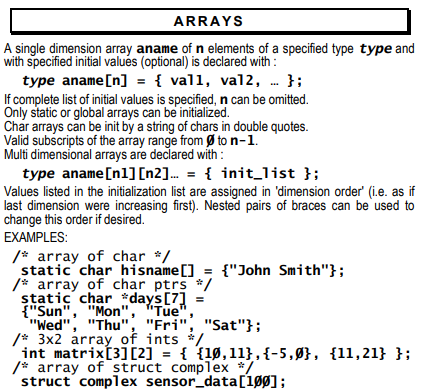
In C all variables must be declared before they are used. This is needed to make sure the correct amount of memory is reserved. Arrays also occupy memory and as such they need to be declared as well. To allow for correct computation of the total amount of memory needed, the data type of each element as well as the number of elements the array will contain, is specified. In its most general form, the declaration of an array can be written as:
type <array_name>[number_of_elements];
int a[10]; // declares an array of 10 integer elements
All arrays consist of contiguous memory locations. The lowest memory address corresponds to the first element of the array and is referred to with index 0, the highest address corresponds to the last element and can be accessed with index “number_of_elements – 1”. The array “a” with 10 integers can be visualized as:
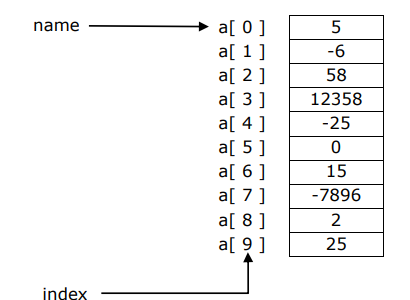
As array index also variables or expressions can be used. To access a valid array element, that variable or expression needs to evaluate to a positive integer belonging to the interval [0, number_of_elements – 1].
Array initialization
Entering a value into a specific array element can be done by the statement: name[index] = value;
Hence, initialization of the array can be done as shown in the code below:
int a[5];
a[0] = 25;
a[1] = -2;
a[2] = 125;
a[3] = -25;
a[4] = 7;
Arrays can also be initialized in the definition of the array with an initializer list as follows:
int a[5] = {25, -2, 125, -25, 7};
Or, if all values are to be set to the same number (zero for instance) a for loop can be used:
int i;
int a[10];
for(i=0; i<10; i++)
{
 a[i] = 0;
}
Array usage
If we want to actually use arrays, we need the possibility to both write to and read from the array elements. Reading a value from a specific array element can be done by the statement:
variable = name[index];
In most programs, the elements of the array will not only be of the same type but also of the same kind. Meaning that they will have similar meaning. As a result, the elements of the array will often be treated in the same way.
Example
Write a program that reads 100 integers and prints them in reverse order.
#include <stdio.h>
#define SIZE 100

int main(void)
{
 int numbers[SIZE];
 int i;

 printf("Enter %d integers: \n", SIZE);
 //read the integers one by one in a for loop
 for (i = 0; i < SIZE; i++)
 {
   printf("Enter integer %3d: ", i + 1);
   scanf("%d%*c", &numbers[i]);
 }

 printf("In reverse order: \n");
 //print the array elements starting from the last one down
 for (i = SIZE - 1; i >= 0; i--)
 {
 printf("%8d", numbers[i]);
 }

 printf(" \n");
 return 0;
}
Note the difference between the scanf and the printf statements!
As indicated before, you can consider an array as a group of variables that belong together. Taking this approach into account, one array element (numbers[i]) can be treated like a normal variable. Therefore, if the address of the variable is needed, like in the scanf function, the address operator & needs to be added, whereas no extra operator is needed in the printf function. The printf function only needs the value of the variable, not the address.
Before the main function definition, an extra precompiler directive is added: define SIZE 100
This allows to specify the size of the array with a symbolic constant. It makes programs more scalable. If for instance in the above example the number of integers needs to be changed into 5 instead of 100, it is sufficient to change only the #define preprocessor directive.
Operations on arrays
Consider 2 arrays a and b, both consisting of 5 elements of the type int. If we want to copy the elements of array a into array b, it cannot simply be done by assigning one array to the other!!
b = a;
does not work if a and b are arrays!
The name of an array points to a series of variables rather than one single variable. Since the starting addresses of the arrays are fixed during program execution, the address of array b cannot be changed inside the program!

As a result, operations on arrays like copy, addition, comparison, … always need to be done looping over all array elements.
Passing arrays to functions
To pass an array to a function, simply use the array name without brackets as function argument:
int a[5];
function(a);
The name of an array evaluates to the starting address of that array. Therefore, instead of passing the full array to the function, actually, the array starting address is passed to the function. As a result, the formal parameter in the function gets the same starting address as the one in the calling function. Or, in other words: the array in the function is the same as the one in the calling function. So, when the called function modifies array elements in its function body, it is modifying the elements of the original array!
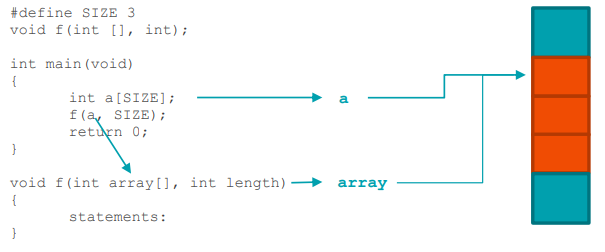
Since all information needed in the called function is the starting address of the original array, there is no need to specify the length of the array in the function declaration and definition. Therefore, often the array length is passed on to the function as an extra parameter.
Array boundaries
In the array declaration, you need to specify the size of the array. For instance “int x[5];” declares an array with 5 integers that can be addressed as x[0], x[1], x[2], x[3] and x[4].
Unfortunately, the C compiler only verifies if every index used is an integer. It will not flag an error if an index outside the array boundaries is used! As a result, memory locations outside the memory reserved for the array will be used, which leads to dangerous and unpredictable behavior.
int main(void)
{
 int b[2];
 int a[2];
 b[0] = 1;
 b[1] = 1;
 a[0] = 1;
 a[1] = 1;
 printf("a[0]=%d,a[1]=%d,b[0]=%d,b[1]=%d\n",a[0],a[1],b[0],b[1]);

 /*unpredictable behavior: b[2] is an invalid array location!*/
 b[2] = 100;
 printf("a[0]=%d,a[1]=%d,b[0]=%d,b[1]=%d\n",a[0],a[1],b[0],b[1]);

 return 0;
}
With following expected result:
a[0]=1,a[1]=1,b[0]=1,b[1]=1
a[0]=1,a[1]=1,b[0]=1,b[1]=1
Unfortunately, running the same program on another machine or at a different time can just as well result in:
a[0]=1,a[1]=1,b[0]=1,b[1]=1
a[0]=100,a[1]=1,b[0]=1,b[1]=1
Summary

Deja una respuesta